Showing posts with label open source. Show all posts

Tuesday, September 17, 2019

D3WASM --- Play Classic DOOM 3 in Your Browser

D3WASM is an experimental port of the Doom 3 Engine to Emscripten/WebAssembly and WebGL, allowing you to play the famous Doom 3 game inside modern web browsers. You can now try the Doom 3 Demo version at (need a modern web browser, and a PC with good CPU and RAM):
http://wasm.continuation-labs.com/d3demo/
Project Homepage: http://www.continuation-labs.com/projects/d3wasm/
Source Code: https://github.com/gabrielcuvillier/d3wasm

Monday, February 11, 2019

Psiphon --- Free and open-source Internet censorship circumvention tool for Windows and Mobile

Psiphon is a free and open-source Internet censorship circumvention tool for Windows and mobile phones. If you're using public WiFi or if your Internet is censored, you can use Psiphon to surf securely and bypassing censorship. Psiphon utilizes a combination of VPN, SSH and HTTP Proxy technology to provide you with free and uncensored access to online content.

Psiphon features "Trust, Speed, Simplicity", so it is very easy to use --- just download, click and run, and the connection speed is fine. However, Psiphon is centrally managed and "does not increase your online privacy, and should not be considered or used as an online security tool" (You should try Tor or I2P instead). Besides, it is only available on Windows, Android and iOS.

Links:
https://psiphon.ca
https://www.psiphon3.com
get@psiphon3.com (request to have Psiphon sent to you via email)
https://bitbucket.org/psiphon/psiphon-circumvention-system (source code)

Saturday, January 27, 2018

Spamnesty --- waste spammers' time by bot

Got a spam email? Just forward it to sp@mnesty.com!
"Spamnesty is a way to waste spammers' time. If you get a spam email, simply forward it to sp@mnesty.com, and Spamnesty will strip your email address, pretend it's a real person and reply to the email. Just remember to strip out any personal information from the body of the email, as it will be used so the reply looks more legitimate.

That way, the spammer will start talking to a bot, and hopefully waste some time there instead of spending it on a real victim. Meanwhile, Spamnesty will send you an email with a link to the conversation, so you can watch it unfold live!"

You can also read these email conversations archived on its homepage, e.g., https://spa.mnesty.com/conversations/aarsvksy/

Links:
https://spa.mnesty.com
Source code: https://gitlab.com/stavros/Spamnesty

Thursday, November 30, 2017

pdf2htmlEX --- Best Tool to Convert PDF to HTML

pdf2htmlEX is a free and open source command line tool to convert PDF files to HTML. pdf2htmlEX can convert PDF elements into corresponding or closest HTML5 elements for rendering in a web browser. It has very good support for all kinds of PDF files, just check the following amazing examples:
Typography: http://coolwanglu.github.io/pdf2htmlEX/demo/geneve.html
Formulas: http://coolwanglu.github.io/pdf2htmlEX/demo/cheat.html
Magazine: http://coolwanglu.github.io/pdf2htmlEX/demo/issue65_en.html

A quick start guide for using the tool: https://github.com/coolwanglu/pdf2htmlEX/wiki/Quick-Start

Official Site: http://coolwanglu.github.io/pdf2htmlEX/

Similar tools:
https://mozilla.github.io/pdf.js/
http://pdftohtml.sourceforge.net
https://poppler.freedesktop.org

Pandoc --- a universal document converter

Pandoc is a free and open source command line tool to convert documents from one format to another. It runs on Windows, macOS, Linux and supports many file formats including HTML, Word, EPUB, LaTeX, PDF, Markdown and so on. You can try it online at: https://pandoc.org/try/

Official Site: https://pandoc.org

Wednesday, November 8, 2017

JDownloader --- a free download management tool

JDownloader is a free, open source download management tool based on Java and running on almost all platforms, including Microsoft Windows, Linux, Mac. It supports direct downloading from various file hosting services, such as Rapidshare, Depositfiles, Mediafire, Qshare, Zshare, Openload, ..., and you can also use your premium accounts of these file hosting services.

Using JDownloader, you can bypass ads, CAPTCHAs and many other "free download" limitations imposed by file hosting services. For example, you can download several files simultaneously over several connections and save waiting time with hosts which limit downloads to one IP address. Other great features include clipboard monitoring, pausing and continuing of downloads, file integrity verification, and auto-extract compressed archives (e.g., RAR).

Official Site:
http://jdownloader.org

Saturday, November 4, 2017

draw.io --- A free open source online diagram drawing application

draw.io is a free and open source online diagram drawing application. Just visit https://www.draw.io and begin to draw your diagrams. There is no need for registration or login and you can import existing diagrams from or save your creations to your local drive or online storage services such as Google Drive, Github, Dropbox, One Drive and Trello. draw.io can also work as a Google Docs add-on. It supports many formats, including PNG, JPEG, PDF, SVG, VSDX (Microsoft Visio), HTML and XML.


Thursday, November 2, 2017

HTTrack Website Copier --- Download Websites for Offline Viewing

HTTrack is a free (open source) and simple offline browser utility working on both Windows (WinHTTrack) and Linux (WebHTTrack).

You can download/cache a website from Internet to a local directory by inputting the website URL and then browse the site offline without Internet connection as if you were viewing it online. It automatically arranges the original structure of relative links for the cloned website and is also able to monitor and update an existing mirrored site.


Official Site: http://www.httrack.com/page/1/en/index.html

Wednesday, March 29, 2017

Tabula --- Free tool to extract tables in PDF as CSV or Microsoft Excel spreadsheet!

"Tabula was created by journalists for journalists and anyone else working with data locked away in PDFs. Tabula will always be free and open source."
Want to copy a table in a PDF document and save it as a CSV file or Excel spreadsheet? Just try the free and open source tool Tabula! It has a very simple and nice user interface (clicking, dragging to draw the selecting box) and works well for most PDF files containing data tables (only text-based PDFs, not scanned documents, though). Tabula is available on Mac, Windows (no installation is needed, just unzip and run) and Linux.
Official Site: http://tabula.technology/
Source Code: https://github.com/tabulapdf/tabula
Links:
https://ropensci.org/blog/blog/2017/04/18/tabulizer (tabulizer: R bindings to the tabula-java library for processing PDF tables programmatically)

Friday, January 22, 2016

VirtualBox - The Best Free x86 and AMD64/Intel64 Virtualization Software

VirtualBox is the best open source free alternative to VMware. You can run multiple virtualized instances of operating systems (Windows, Linux, Mac) on your PC. For example, you can install Android on your PC, try Linux on Windows, or run Mac OS X inside Windows, and sandbox softwares for security.


Links:
https://www.virtualbox.org/
http://www.osboxes.org/virtualbox-images/ (place to download VirtualBox/VMware images with pre-installed OS)

Monday, January 18, 2016

Install Android on Your PC or Mac

Android-x86 is an open source project to port the Android OS to x86 PC so you can directly run Android on your PC or laptop. Different from Android emulators on Windows PC or Mac, you can install Android as your main operation system.


Two customized and polished Android ROM for PC based on Android-x86 are Phoenix OS and Remix OS. Besides beautifying the UI, these two also bring many useful things such as Windows-like start menu, "ctrl+c/v", multi-window & task and so on.
Links:
Android-x86: http://www.android-x86.org/
Phoenix OS: http://www.phoenixos.com/
Remix OS: http://www.jide.com/remixos-for-pc
http://liliputing.com/2016/01/remix-os-for-pc-how-to-install-the-google-play-store.html

Sunday, March 15, 2015

Free & Open Source Online Grammar and Spell Checker

LanguageTool is an open source proof­reading soft­ware for more than 20 languages, including English, French, German, Polish, Chinese... It finds many errors and several grammar problems that a simple spell checker cannot detect. You can check your grammar and spell online and can also download the plugin for LibreOffice and OpenOffice, and the browser extension for Firefox or a stand-alone for your Desktop.

Official Site: https://www.languagetool.org/
Source Code: https://github.com/languagetool-org/


Grammark is an open source online writing aide for the English language that helps improve writing style & grammar and teaches students to self-edit.Works best for college-level essays, it gives a "score" based on problems and is customizable.

Official Site: http://grammark.org/
Source Code: https://github.com/markfullmer/grammark

Sunday, February 1, 2015

PPSSPP - A Free & Open Source PSP Emulator

The best free & open source PSP emulator PPSSPP just got the 1.0 release! PPSSPP can run your PSP games on your PC, Mac, and even Android and iOS device (and also many other platforms by unofficial ports, such as Linux, Blackberry and Symbian)! It supports most commercial PSP games at a decent frame rate, and what's more, as the unique emulator features, you can play in full HD resolution and save & restore game state anywhere, anytime!

Official Site: http://ppsspp.org/index.html
Download: http://ppsspp.org/downloads.html
Commercial Games - Compatibility and Results:
http://forums.ppsspp.org/forumdisplay.php?fid=5

Wednesday, January 14, 2015

KOReader - Turn Your Android Phone and Tablet into a Kindle-like E-reader

KOReader is an open source document viewer, originally created for Kindle e-ink readers. It currently runs on Kindle 5 (Touch), Kindle Paperwhite, Kobo and Android (2.3+) devices.

The most important feature of this app as a pdf reader that many other apps (including Adobe's own PDF Reader for Android) don't have, is text reflow for scanned documents and scientific documents with lots of mathematical formulas, thanks to its built-in K2pdfopt support. What's more, since it is originally designed for Kindle e-ink reader, the app has a very similar look and feel as the Kindle e-ink user interface, which is very clean and elegant. However, first time users may not be used to this Kindle-like interface and touch. For example, at first I thought I need to scroll down from the top of the screen to open reader's setting menus, which is of course a conflict with the default gesture input for opening the Android message center. Then I realized that a single tap at the top center of the screen is the right way to open the setting (while the typical back and menu buttons of an Android phone actually do nothing with the app). But if you have some experience with the Kindle e-reader, it is very natural and easy for you to get started with the app.


This free app can be download at:
https://github.com/koreader/koreader/wiki/Download
(Including ".apk" version for Android phones and tablets, as well as the Kindle and Kobo e-ink reader version.)

Links:
http://www.mobileread.com/forums/showthread.php?t=209276
https://github.com/koreader/koreader/ (Source Code: AGPL)

Tuesday, January 6, 2015

Wednesday, December 31, 2014

Free Tools for Cropping PDFs

Every time I want to print some PDF documents, I'd like to put at least two pages of the PDF onto a single sheet to save papers. Now here comes the problem: many PDF documents have very large margins, and these empty spaces make the final printed content have very small font size, which is not comfortable for reading. Unlike Microsoft Word documents, which have many editors to reset the margin space for printing, most PDFs are not editable. But for PDFs, there are several free and open source tools for removing margins.

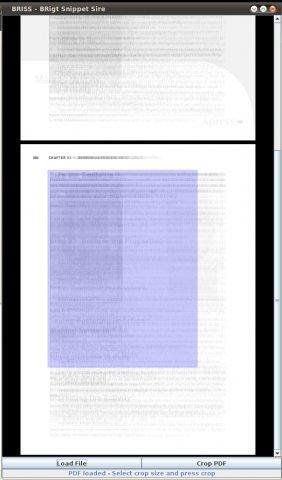
1. Briss 
A simple cross-platform application for cropping PDF files. A simple user interface lets you define exactly the crop-region by fitting a rectangle on the visually overlaid pages.
http://briss.sourceforge.net/

2. PDF Scissors
https://sites.google.com/site/pdfscissors/

This one is very similar to Briss, you can see all pages together in stacked view to find the right content rectangle. It can also run online as a Java applet.

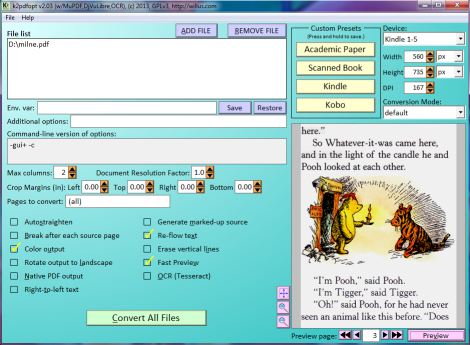
3. K2pdfopt
K2pdfopt optimizes PDF/DJVU files for mobile e-readers (e.g. the Kindle) and smartphones. It works well on multi-column PDF/DJVU files and can re-flow text even on scanned PDF files. It can also be used as a general PDF copying/cropping/re-sizing/OCR-ing manipulation tool. It can generate native or bitmapped PDF output, with an optional OCR layer. There are downloads for MS Windows, Mac OSX, and Linux. 
http://www.willus.com/k2pdfopt/

Both Briss and PDF Scissors require Java. If you're using a public PC where Java is not available, you can try this one. K2pdfopt has many functions for converting PDF to view on e-readers, but for printing purpose conversions, all you need is to change the "Conversion Mode:" to "crop" and leave all other setting as default - the tool will remove the empty spaces automatically.

Links:
http://willus.com/k2pdfopt/pdf_conversion.shtml

Saturday, May 3, 2014

The Dark Mod - Standalone Thief-Inspired Game Mod Based on Doom 3 Engine Source Code

The Dark Mod, PC Gamer's 2013 Mod of the Year award winner, inspired by Thief series by Looking Glass Studios, based on the Doom 3 engine source code, is a first person view stealth game in a Gothic Steampunk world.
The Dark Mod includes creative new gameplay features, dozens of unique AI, and a complete set of custom art assets, allowing players and mappers alike to enjoy missions in a gothic steampunk universe. When you play The Dark Mod, you feel like you’re playing a gothic stealth game... there's nothing left that's recognizable from Doom 3.

Download:
http://www.thedarkmod.com/downloads/

Links:
http://www.thedarkmod.com/main/
http://www.moddb.com/mods/the-dark-mod